
 Install
Who it's for For developers and QA
Website feedback tool for developers and QA

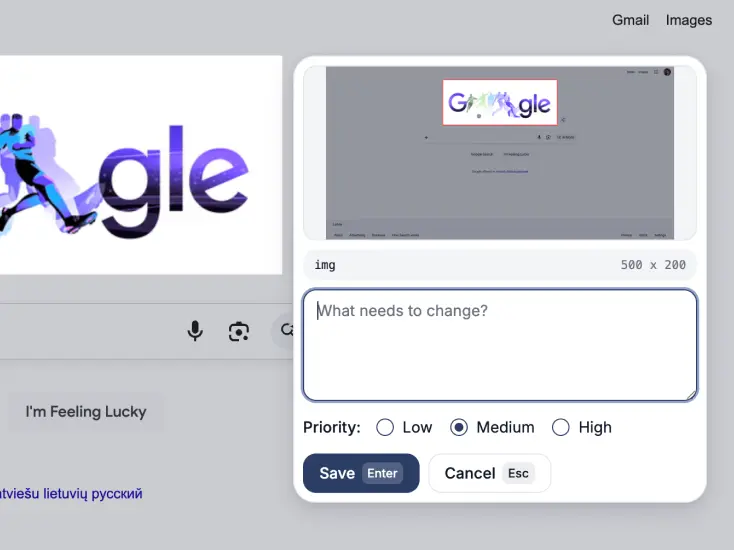
A bug is easy to spot and surprisingly hard to describe. “The button is broken” can start a long thread about which button, on which page, and at what screen size.
Website Feedback Tool keeps that context with the comment. QA can report the issue on the page. The developer can open one review and see what needs attention.
Capture the bug where it happens
Open the extension on the staging or live page, then choose the clearest way to show the problem:
- Select one element when the problem belongs to a button, field, image, or block.
- Drag over an area when spacing or layout is wrong.
- Record a short clip for a broken flow, animation, or state change.
- Write what you expected, what happened, and how serious it is.
Keep the useful context together
Each saved comment carries more than a sentence. That gives the developer a useful starting point before asking QA to reproduce the issue again.
| Question | Context in the review |
|---|---|
| Where did it happen? | The page URL, title, and viewport size. |
| What is affected? | The selected element or marked area, with a screenshot. |
| How urgent is it? | A Low, Medium, or High priority on the comment. |
| Is it a behaviour bug? | A short screen recording can show the steps and result. |
| Do you need browser details? | Optional diagnostics can include console, network, and environment data. |
Run a test pass as one review
Keep adding comments while you test. They stay in one review instead of becoming separate screenshots across Slack, email, and a shared folder.
For a larger release, create separate reviews by page, feature, or test round. This keeps the handoff small enough to act on.
Hand the review to the developer
When the test pass is done, choose the format that fits the team:
- Share one link so the developer can open every comment in context.
- Download HTML or PDF for a ticket, Slack thread, or release record.
- Send the review to Claude Code or Codex to give an AI coding agent structured context.
Use it with your issue tracker
Website Feedback Tool does not replace Jira, Linear, or GitHub Issues. Those tools are still better for owners, status, planning, and release history.
Use the extension to capture the evidence. Add the review link or export to the ticket when the bug needs to enter the team workflow.
I built the tool to remove the repeated work between finding a visual bug and giving someone enough detail to fix it. You can read why I built it.